

Workflow Usage
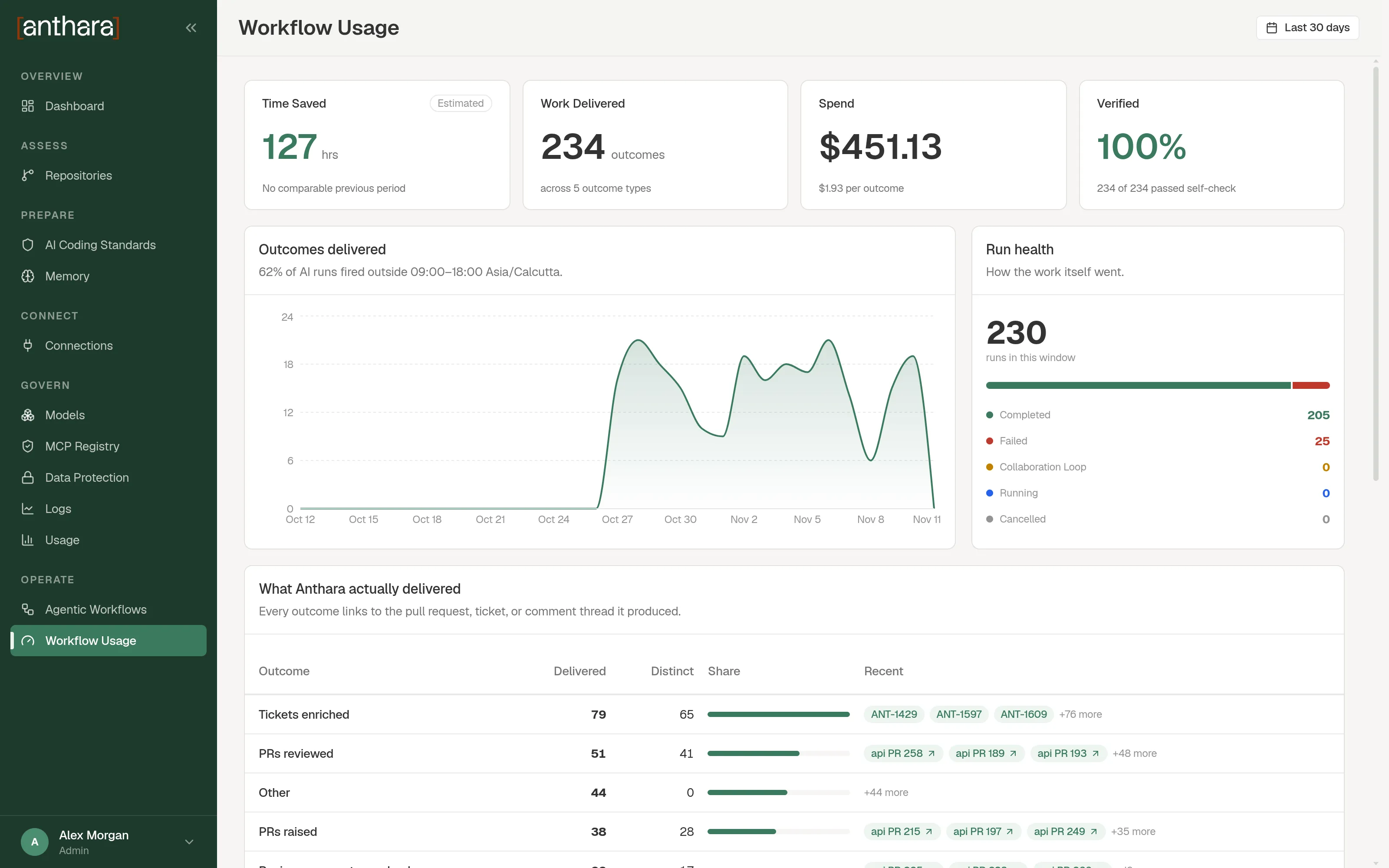
The Workflow Usage page shows what your workflows delivered and what they cost. Open it from Workflow Usage in the sidebar.
Use the date range picker at the top right to choose the period. Every part of the page follows that period.
The four tiles
Section titled “The four tiles”| Tile | What it shows |
|---|---|
| Time Saved | Hours of manual work the workflows saved. This number is an estimate, and the tile is marked Estimated. |
| Work Delivered | How many outcomes the workflows produced, and across how many outcome types. |
| Spend | The model cost of the runs in US dollars, and the cost per outcome. |
| Verified | The share of outcomes that passed a self-check. |
An outcome is one finished piece of work, such as a reviewed pull request. After a run, Anthara checks what the run produced and records the outcomes.
| Outcome type | Shown as |
|---|---|
| A pull request was reviewed | PRs reviewed |
| A review comment was resolved | Review comments resolved |
| A ticket was improved | Tickets enriched |
| A pull request was opened | PRs raised |
| A test suite was written | QA suites authored |
Outcomes delivered
Section titled “Outcomes delivered”A chart of outcomes over time. The line under the title shows the share of AI runs that started outside 09:00 to 18:00 in your business time zone.
Run health
Section titled “Run health”A breakdown of runs by status, such as Completed, Failed, Collaboration Loop, and Cancelled. Use it to see how many runs finished and how many are waiting for a person.
What Anthara actually delivered
Section titled “What Anthara actually delivered”A table with one row per outcome type. Every outcome links to the pull request, ticket, or comment thread it produced.
| Column | Meaning |
|---|---|
| Outcome | The outcome type. |
| Delivered | How many outcomes of this type were delivered. |
| Distinct | How many different pull requests, tickets, or threads those outcomes point to. Two outcomes on the same pull request count once. |
| Share | This type’s share of all outcomes. |
| Recent | Links to the most recent outcomes. |
Value by workflow
Section titled “Value by workflow”A table with one row per workflow. Use it to compare workflows.
| Column | Meaning |
|---|---|
| Workflow | The workflow name. A deleted workflow is marked Retired. |
| Runs | How many runs it had in the period. |
| Outcomes | How many outcomes it delivered. |
| Time saved | The estimated time it saved. |
| Spend | What its runs cost. |
| Per outcome | Spend divided by outcomes. |
| Success | The share of its outcomes that passed the self-check. |
How the numbers are produced
Section titled “How the numbers are produced”Cost and turns are recorded by each AI step when it ends. Time saved and outcomes come from an AI review of the run after it finishes, so treat them as estimates. Time Saved is the sum of the estimates for every run in the period.
For model spend outside workflows, see Usage.